There is a whole profession — lawyers, economists, insolvency administrators, estate practitioners — whose daily work is handling many matters for many clients at once. And that profession has a fear nobody says out loud: the deadline that slips away. A statement of defence that was due yesterday, an appeal computed with a forgotten local holiday, an August someone counted as a working month. That is not an administrative slip: it is professional liability.
NAiOS Despacho is the suite's module for that profession: the complete case file, a deadline engine that always shows its arithmetic, a conflict-of-interest check on every new matter, and time billing that turns hours and milestones into a draft invoice in your ERP. All of it built on the house doctrine taken to its extreme — because here it is not style: it is necessity.
Every matter, a real case file
A Despacho case file has an auto-numbered reference per year (2026/001, 2026/002…), its type — litigation, insolvency, out-of-court, inheritance, employment, tax, corporate —, the court and docket number where relevant, the parties and opposing parties with their tax IDs, attached documents, the current stage, the person in charge… and the record: an immutable log of everything that happens in the matter. Who opened it, which deadline was confirmed, which conflict was assumed and with what justification. When someone asks in two years «why was this done?», the answer is in the record, not in anyone's memory.
Plus a layer generic document managers do not have: professional secrecy inside your own team. A sensitive matter can be marked restricted, and only the firm's owner, the person in charge and explicitly authorised colleagues can see it — not even an admin gets in. It does not appear in lists, agendas or anyone else's calendar.
A deadline is never asserted: it is proposed
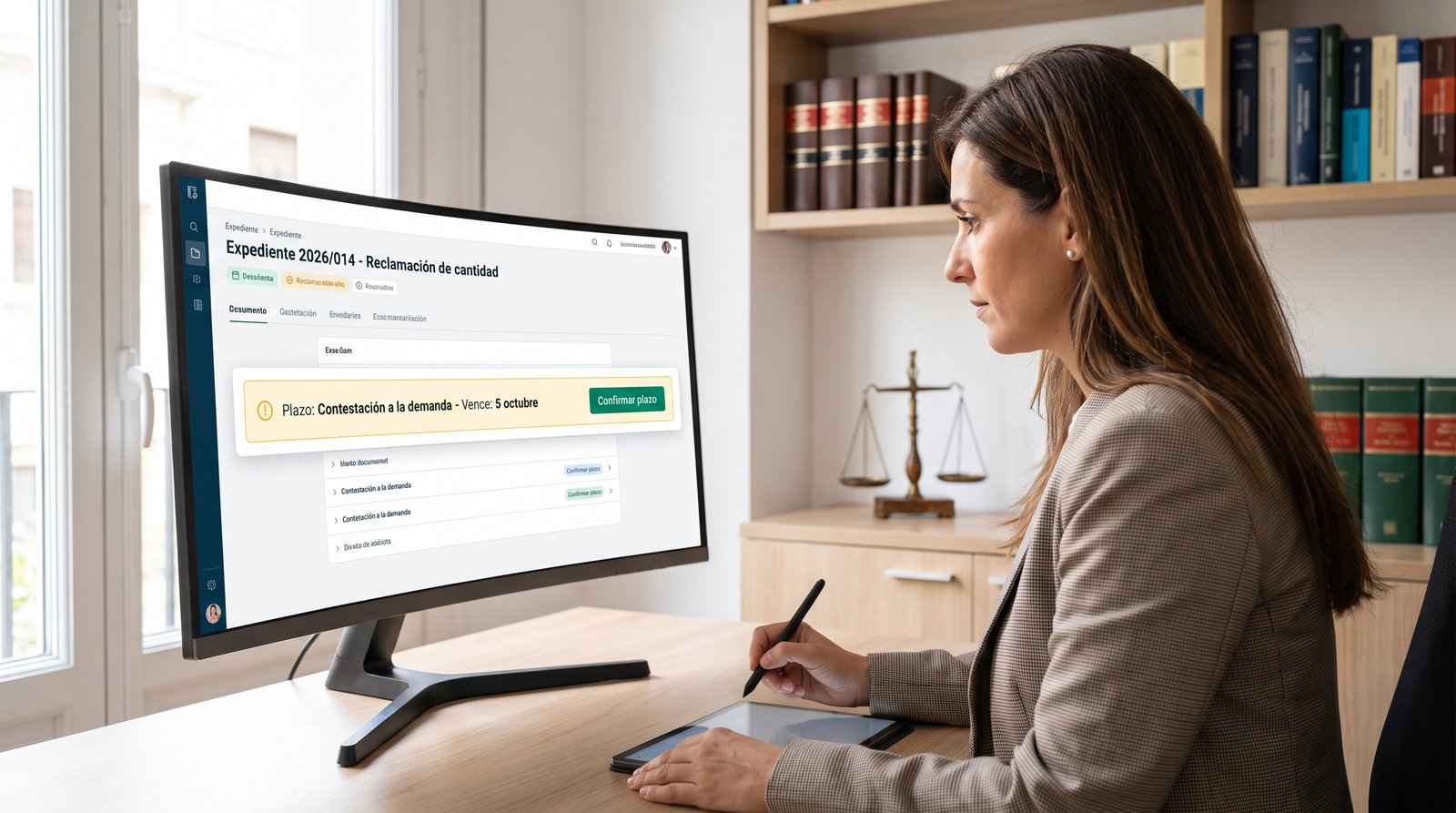
Here is the heart of the module, and its most important design decision. When you create a deadline — from a template (defence in ordinary proceedings, 20 days; motion for reconsideration, 5; insolvency claim filing, one month; inheritance tax, six months…) or custom — the engine computes the due date with the real Spanish procedural rules: working days that start counting the day after notification, weekends and holidays excluded, August as a non-working month in litigation (and working in administrative matters — you choose per deadline), months counted date-to-date, and the rollover to the next working day when a deadline lands on a non-working one.
But the result is never taken on faith. The deadline is born proposed, with its computation broken down in plain sight — «starts counting on 8 September, skips 8 weekend days and 1 holiday, rule of art. 133.1 LEC» — and until a person confirms it, it alerts no one. Once confirmed, it notifies the person in charge seven days ahead and on the eve, and it appears in your Calendar with its ⚖️ scales. Holidays are your data: national ones are preloaded, regional ones come as one-click packs, and your local court district's are maintained by you — because a badly loaded local holiday is exactly the kind of error this module exists to prevent.

The inbox that reads court notifications
Court notifications arrive as PDFs — Spain's LexNET system exports them that way — and someone has to read them, find the case file and compute the deadline they open. Despacho's inbox does the mechanical part: upload the PDF and it extracts the court, the docket number, the type of act and the notification date, suggests the matching case file by docket and preloads the template of the deadline it probably opens. A summons to answer proposes the 20-day defence; an insolvency declaration order, the claim filing.
With the usual honesty: AI-assisted extraction comes labelled as such so you review it, a scanned PDF that cannot be read tells you so and lets you fill the fields by hand, and nothing links or computes on its own — you choose the case, you accept the deadline, and the deadline still arrives as a proposal. Double lock.
Conflicts of interest, caught at intake
Before accepting a matter, the mandatory question: is the opposing party our client? Is the new client an opposing party in another matter of the firm? Despacho cross-checks tax ID and normalised name against the entire client base and every opposing party — when adding a client, opening a case, or adding an opponent. On a match it blocks and shows you where; you can proceed by writing a justification (informed consent, unrelated matters) that stays in the record forever. And if the clash is with a restricted case, you are only told that it exists: professional secrecy holds even inside the conflict check.
Billing: from the minute to the draft invoice
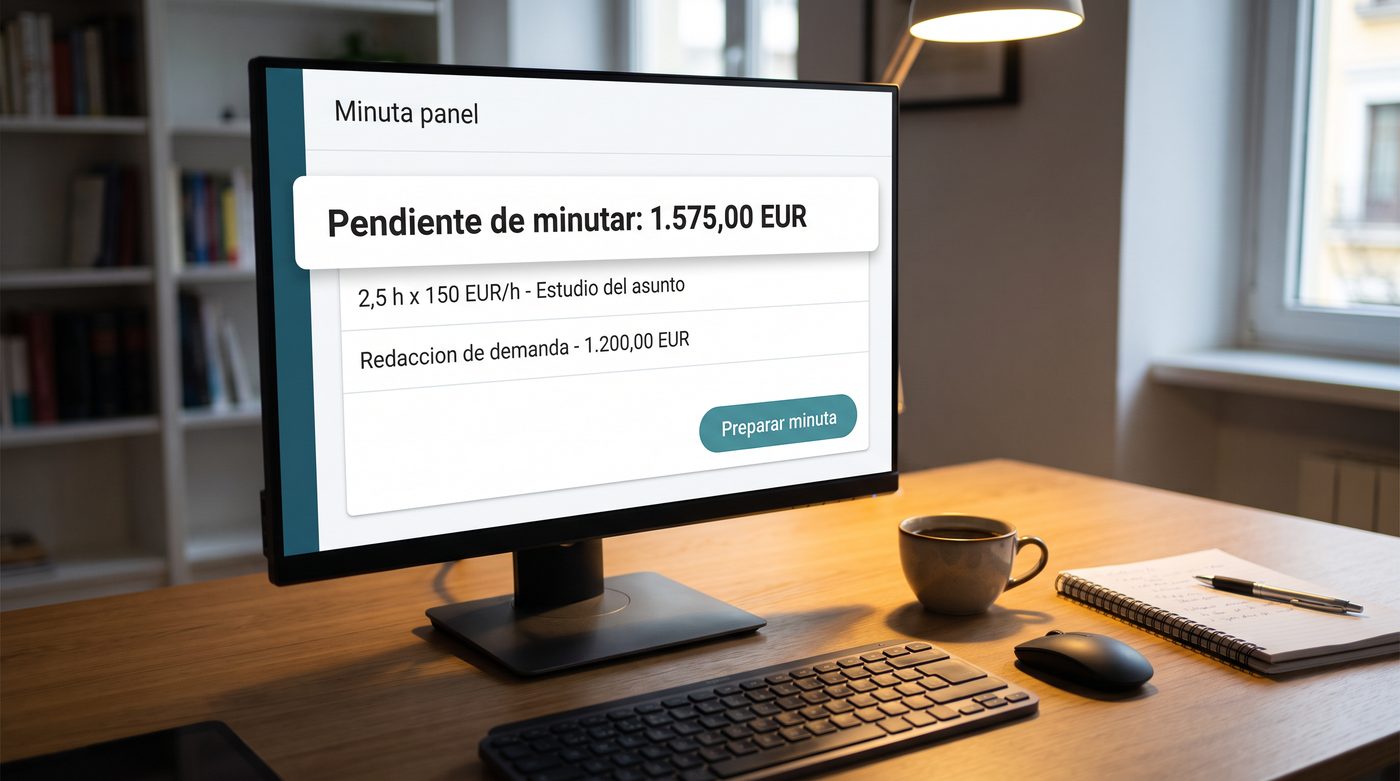
The other half of the profession is getting paid for it. Every case carries its time entries — minutes or hours with a note, with each person's hourly rate snapshotted at entry time, so raising rates tomorrow never re-prices yesterday's work —, its fixed-fee milestones («drafting the claim, €1,200») and its client retainers with a visible balance.
When it is time to bill, one button: Prepare invoice aggregates pending time per person plus milestones, and leaves a draft invoice in your ERP — itemised, with the retainer noted, and nothing issued: you review and issue it yourself, with your series, your VeriFactu chain and your usual numbering. Billed items become immutable. And the firm's profitability report — unbilled hours, pending amounts and retainers per case — becomes a NAiOS Office spreadsheet with one more click.
A copilot with a double lock
The firm's copilotAI CopilotAI Assistant integrated into work tools answers with your real data: «what is due this week?», «how is my portfolio?», «which cases have unbilled work?». And if you ask it for a deadline, it does not create one: it leaves a proposal card you approve with one click — and even then the deadline is born proposed and you confirm it in the agenda. The NAiOS chat works the same way: Despacho's tools read and propose, never confirm. In a module where mistakes are measured in professional liability, the last word always belongs to a licensed professional, not to a model.
Pleadings, legal aid and the trade's details
From the case file, Generate pleading creates a procedural skeleton in Office with the data already filled in — heading to the court, docket, parties — for the defence, the motion for reconsideration, the insolvency claim or a generic filing, with the blanks marked for drafting (you, or the chat working on the document). Legal-aid matters are flagged with their bar designation number and have their own filter. And the team works like everywhere in the suite: invited colleagues with fine-grained permissions and assigned clients — each person sees only what is theirs.
Three ways to use it
The litigator who lives by deadlines
A firm with forty live matters uploads every notification to the inbox as it arrives. The system ties it to the case, proposes the deadline, the lawyer confirms it with the computation in front of them — and from there the agenda, the bell and the Calendar work on their own. On Mondays there is one question for the copilot: «what is due this week?».
The insolvency economist (with the advisory firm next door)
A consultancy that already runs its tax practice on NAiOS Gestoría opens its insolvency and restructuring matters in Despacho: claim filings one month from the official gazette, incidents at ten working days, debtor retainers with the balance in sight, and the bill to the ERP once the court approves fees. Tax in Gestoría, matters in Despacho, invoicing in the ERP: one house.
The inheritance that takes fourteen months
An estate case with the co-heirs as parties, the six-month inheritance-tax deadline proposed from the date of death (rollover watched), the documents — certificates, deeds, partition books — attached with their audit trail, and every hour of every errand logged so the final bill leaves nothing behind.
Getting started takes five minutes
Like everything in NAiOS: open Despacho, add your first client, open their case and create the first deadline — the broken-down computation shows you in ten seconds how the engine thinks. Invite your team whenever you want, set rates when it is time to bill, and upload the first notification when it arrives. If you are coming from paper or a deadlines spreadsheet, the change is not one of tooling: it is sleeping better.
Despacho ships with the full suite behind it: Gestoría for the tax practice, the ERP for VeriFactu invoicing, Fichaje for the firm's own working-time register — and a whole platform where the AI assistant works with your data without ever deciding for you. Which is, in the end, what a licensed professional needs from software: do everything mechanical, and hold no opinion on what they sign.