Claude Opus 4.8 in NaiOS: how to use the best AI models from a single platform
Claude Opus 4.8 is a new generation of advanced model oriented towards complex tasks such as reasoning, analysis, programming, research, and working with demanding information. For a company, the important question is not just whether it should use Opus 4.8, GPT, Gemini, or another model.
The useful question is different: how to choose the right model for each task without dispersing data, processes, and teams.
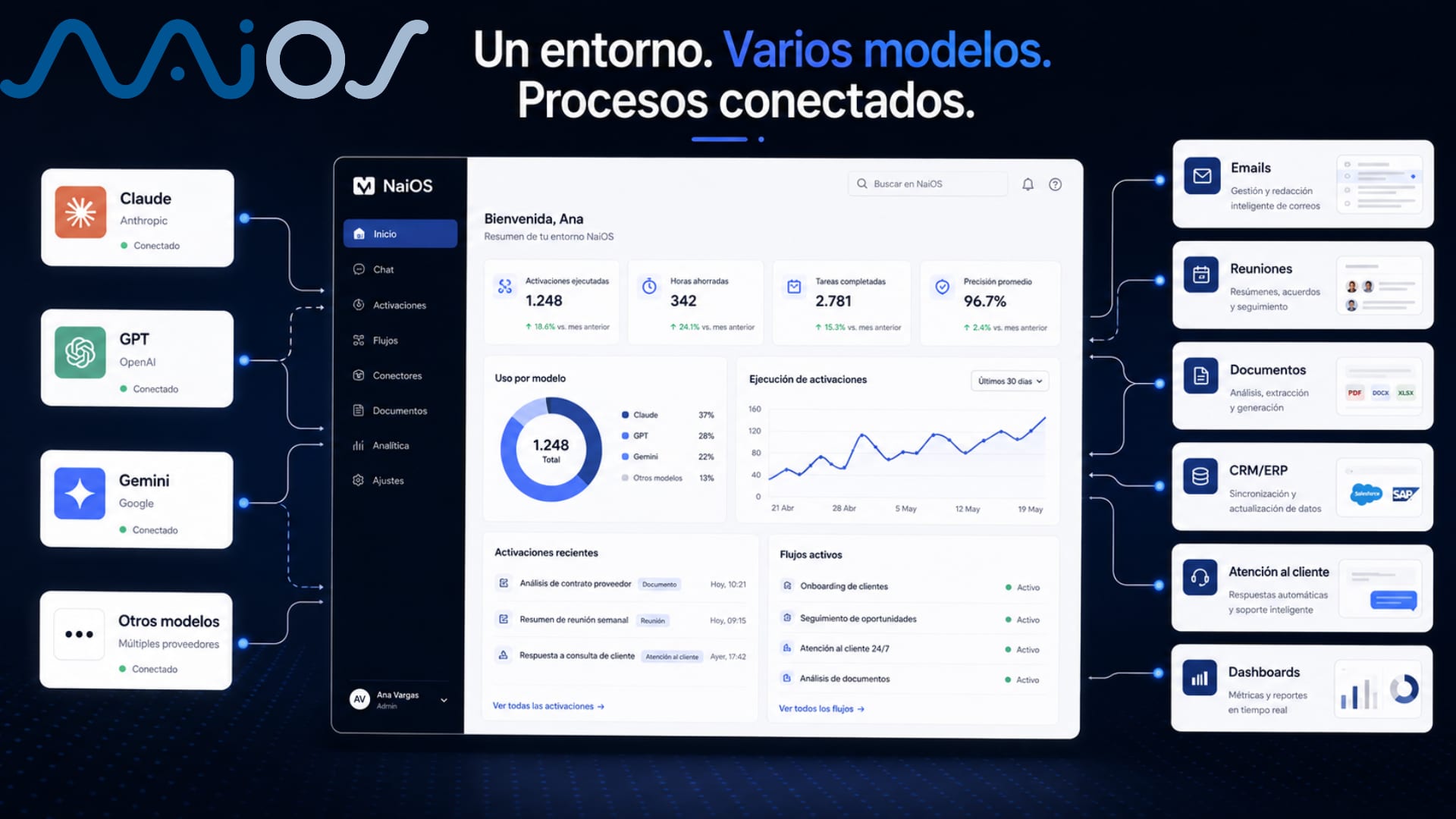
NaiOS allows working with different AI models from a single business environment. Thus, an SME can use models like Claude, GPT, Gemini, and others depending on the use case: analyzing documents, writing emails, creating content, generating reports, working with meetings, consulting a Knowledge Base, or building automation flows.
The real problem
Every time a new model appears, many companies do the same thing.
Someone tries it out of curiosity.
Another team uses it to write emails.
Marketing uses it for campaigns.
Operations tests it with internal documents.
Management starts wondering if that model is better than the previous one.
And in a few weeks, the company has a small, silent chaos.
Not because AI is bad. The problem is using it without operational criteria.
A company doesn't need to chase every new model as if it were a race. It needs a system to decide which model to use, in which process, with which data, and under what control.
Claude Opus 4.8 can be very useful for complex tasks. GPT may fit better in others. Gemini can provide value in certain scenarios. Other models may be suitable for fast tasks, specific costs, or specific needs.
The mistake is forcing the entire company to marry a single model.
The second mistake is doing the exact opposite: letting each person use whichever one they want, wherever they want, and with whatever data they want.
How NaiOS helps
NaiOS is designed as an AI SaaS platform for companies. It does not function as an isolated tool, but as an environment where the company can work with AI in real processes.
One of its advantages is the selection of models. Users can choose between different AI models, such as Claude, GPT, Gemini, and others, depending on the task or team preference.
This enables something very practical: not turning AI adoption into a closed bet on a single provider.
From NAiOS, a company can work with several models within the same environment and combine them with features such as:
multimodalMultimodalModels that understand and generate text, image, audio and video AI chat,
document analysis,
Knowledge Base / RAGRAG (Retrieval Augmented Generation)Combine real data search with text generation,
meeting recording and summary,
creation of Word, Excel, and PowerPoint files,
generation of images, video, audio, and podcasts,
App Builder,
MCPModel Context Protocol (MCP)Standard protocol for models to connect with external tools for connection with enterprise software,
OmniChat for multichannel support,
NAiOSMail for managing email with AI,
prompt and workflow repository.
The key is not in using the most famous model. It is in choosing the right model for each workflow.
Step by step: how to use Opus 4.8 and other models within a business strategy with NAiOS
Step 1. Define the task before choosing the model
What to do:
Before opening a chat, define what you need to solve: analyzing a contract, summarizing a meeting, drafting a proposal, reviewing data, creating a campaign, or responding to emails.
NAiOS Feature:
Multimodal AI chat and model selection.
Result:
The team stops choosing models based on trends and starts choosing them based on utility.
Example: if you need to analyze a complex document, you can try an advanced model like Claude Opus 4.8. If you need a faster or more repetitive task, perhaps another model will be sufficient.
Step 2. Use NAiOS as a single point of entry
What to do:
Centralize the use of AI on a single platform, instead of having each department working with separate tools.
NAiOS Feature:
Unified AI environment with access to different models.
Result:
The company gains control. Teams do not have to jump between multiple platforms to perform different tasks.
This reduces friction and improves work consistency.
Step 3. Compare responses between models when the task is important
What to do:
For sensitive decisions, compare the response from several models. For example, a risk analysis, an important commercial proposal, or an interpretation of internal documentation.
NAiOS Feature:
Model selection and switching according to the task.
Result:
The user does not settle for the first answer.
You can contrast approaches and choose the most useful one.
This is especially interesting for management, legal, operations, sales, or document analysis.
Step 4. Connect the model with real company knowledge
What to do:
Upload internal documentation to the Knowledge Base so that the AI does not respond only from general knowledge.
NAiOS functionality:
RAG / Enterprise Knowledge Base.
Result:
The model can work with real company information: catalogs, manuals, policies, proposals, contracts, processes, or technical documentation.
The difference is huge. It is one thing to ask a general model. It is another to ask it to reason about your own documents.
Step 5. Convert good instructions into reusable workflows
What to do:
When you find a good way to work with a model, save the prompt or the flow to reuse it.
NAiOS functionality:
Prompt and workflow repository.
Result:
The company does not depend on a person remembering how they asked for something. Knowledge becomes a process.
This helps sales, marketing, operations, HR, and customer service work with more consistency.
Step 6. Take AI to real processes, not just conversations
What to do:
Use models within complete flows: meeting, minutes, tasks, follow-up email, document updates, or connection with CRM/ERP.
NAiOS functionality:
Meeting recorder, document generation, MCP, App Builder, NAiOSMail, and OmniChat.
Result:
AI stops being a response on a screen and starts becoming part of daily work.
That is the important leap for an SME.
Practical example
Imagine an industrial company of 45 people.
It has a sales team, administration, operations, and customer service. It already uses AI, but in a disorganized way. A salesperson uses Claude. Marketing uses GPT. Administration tests another model to summarize documents. Management does not know what data is being uploaded or which processes already depend on those tools.
With NAiOS, the company can organize that use.
The sales team uses an advanced model to review complex proposals and prepare responses to important clients.
Administration uses the Knowledge Base to consult contracts, terms, and internal procedures.
Operations analyzes documents and generates follow-up reports.
Customer service works with OmniChat to answer frequent queries and capture leads or orders in a structured way.
Management has a clear advantage: it does not have to decide between Claude, GPT, or Gemini as if they were sides. You can use each model where it adds the most value, within a single environment.
The conversation stops being:
“Which model is better?”
And becomes:
“Which process do we want to improve and which model fits best here?”
Before and after
ProcessBefore NaiOSWith NaiOSChoosing AI modelsEach person tries tools on their ownThe company can choose models from a unified environmentDocument analysisFiles uploaded to separate tools, with no common criteriaDocuments analyzed from NaiOS and connected to the Knowledge BaseUse of Claude, GPT, Gemini or other modelsDependence on individual access and scattered testsModel selection based on task, team or use caseMeetingsManual notes, lost agreements and irregular follow-upRecording, transcription, minutes and action pointsEmailsManual drafting and inconsistent follow-upNAiOSMail lets you summarize, prioritize and prepare responsesCustomer serviceWhatsApp, Telegram or emails managed manuallyOmniChat helps respond and capture structured informationInternal knowledgeDocuments spread across folders, PDFs and spreadsheetsKnowledge Base searchable through AIRepeatable processesEach user invents their own way of workingReusable prompts and workflows across teams
Common mistakes a company should avoid
1. Choosing a model just because it's trendy
A new model can be very powerful, but that doesn't mean it's necessary for every task.
To write a simple email, you may not need the most advanced model. To review a contract, analyze technical documentation or prepare a complex proposal, it can indeed make sense.
2. Using different models without control
Variety is good when it's governed.
If each team uses a different tool, with different accounts and scattered data, the company gains speed in the short term, but loses control.
3. Confusing model with system
Claude Opus 4.8, GPT or Gemini are models. NaiOS is a platform for using them within business processes.
The difference matters.
A model responds.
A platform helps turn that response into a workflow.
4. Not connecting AI with internal knowledge
Asking a model without business context can be useful for general ideas.
But if you want useful answers about your company, you need real documentation: policies, rates, contracts, records, procedures or catalogs.
That's where the Knowledge Base comes in.
5. Not saving your best prompts
Many companies discover good prompts and then lose them.
This means each person starts from scratch. NaiOS lets you save prompts and workflows so the team doesn't depend on memory, screenshots or loose documents.
6. Measuring AI out of curiosity, not by process
Trying a new model is fine. But a company should ask itself:
Which task does it improve?
How much time does it save?
What risk does it reduce?
What process does it organize?
Which team is going to use it?
Without that answer, AI remains just an experiment.
Reusable prompt or template
You can copy this template into NaiOS to decide which model to use for a specific task:
Template: choosing a model for a business task
I want to solve this task within NaiOS:
Task: [describe the specific task]
Department: [sales / marketing / operations / HR / management / customer service / administration]
Type of information: [internal documents / emails / meetings / data / content / customer service]
Data sensitivity level: [low / medium / high]
Expected outcome: [summary / report / response / proposal / table / presentation / workflow]
I need to prioritize: [quality / speed / cost / reasoning / creativity / accuracy / security]
Compare for me which type of model is best to use for this task and explain:
which model you would choose first,
when you would try another model,
what information I should provide to improve the response,
what risks I should review before using the result,
how to turn this task into a reusable workflow.
FAQ
What is Claude Opus 4.8?
Claude Opus 4.8 is an advanced model from Anthropic aimed at complex tasks such as reasoning, analysis, programming, research and working with demanding information. For a company, it can be useful in tasks where more depth, better judgment or more careful analysis is needed.
Can I use Claude Opus 4.8 from NaiOS?
NaiOS lets you work with different AI models, such as Claude, GPT, Gemini and others, from a single environment. The specific availability of each model may depend on the platform's active configuration and the contracted plan.
What is the difference between using Claude directly and using NaiOS?
Using Claude directly can be useful for individual tasks. Using NaiOS lets you integrate different models within business processes: documents, meetings, Knowledge Base, workflows, emails, customer service, App Builder or connections with systems such as CRM and ERP.
Why should a company use several AI models?
Because not all tasks need the same type of model. Some require deep reasoning. Others need speed. Others, creative generation. Others, document analysis. A multi-model platform allows for better choices without changing environments.
Is it safe to use AI models with internal documentation?
It depends on how the AI is used and what controls are in place. At NAiOS, the business logic involves centralizing usage, working with Knowledge Base, organizing workflows, and preventing each user from uploading sensitive data to separate tools without criteria.
What data do I need to get started?
To get started, you don't need to upload the entire company. The reasonable approach is to choose a specific process and provide the necessary documents or examples: emails, minutes, PDFs, contracts, FAQs, catalogs, procedures, or structured data.
Which departments can benefit from a multi-model platform?
Management, sales, marketing, operations, customer service, administration, and HR. Each area can use different models depending on their work: writing, analyzing, summarizing, responding, creating reports, consulting documentation, or automating tasks.
Can I connect it to CRM or ERP?
NAiOS includes connection with business software via MCP, which allows connecting AI with tools such as CRM, ERP, CMMS, TMS, accounting, ecommerce, or other systems that expose an API. The specific integration will depend on the system and the use case.
Summary for management
Claude Opus 4.8 reinforces a clear idea: AI models evolve quickly, and a company should not depend on just one.
NAiOS allows working with different models from a business environment, instead of scattering AI usage across separate tools.
The advantage is not in using “the best model” for everything, but in choosing the right model for each task.
A multi-model platform helps organize processes, data, teams, and workflows.
The next step is not to try another chat. It is to identify which company process deserves AI and configure it properly.
Do you want to see how NAiOS would work in your company with Claude, GPT, Gemini, and other AI models?
Request a demo and we will show you how to choose the right model for your real processes: documents, emails, meetings, customer service, CRM, ERP, marketing, sales, or operations.
info@netretina.ai